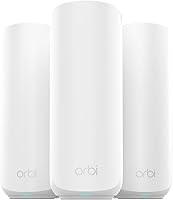
Can You Use eero With Xfinity?
Yes, you can use eero with Xfinity by connecting the main eero to an Xfinity gateway or compatible modem with Ethernet. For a gateway, choose one router: bridge the Xfinity gateway so eero handles routing, or bridge eero so the gateway keeps that role.
On this page (8 sections)
- Does eero replace your Xfinity gateway or modem?
- Should you use bridge mode with eero and Xfinity?
- How do you connect eero to an Xfinity gateway?
- Which eero system fits your Xfinity connection?
- Where should you place eero units for useful coverage?
- What should you check if eero has no internet or feels slow?
- Can you keep Xfinity Wi-Fi alongside eero?
- Which eero with Xfinity setup should you choose?
Yes, you can use eero with Xfinity by connecting the main eero to an Xfinity gateway or compatible modem with Ethernet. For most homes using a gateway, the clearest setup is to let eero manage routing and Wi-Fi, with the gateway in bridge mode.
You still need a modem for Xfinity's cable connection. Before buying a mesh kit, check your current equipment, plan speed, and where coverage falls short.
Does eero replace your Xfinity gateway or modem?
eero replaces the home router and Wi-Fi role, but it does not replace a cable modem. An Xfinity gateway combines modem and router functions, while a modem-only unit needs a separate router such as eero.
With a gateway, you can keep the modem function active and bridge its router function. With a modem-only unit, connect the main eero directly without that extra setting.
Don't cancel equipment rental or return your gateway until you have a compatible replacement modem activated and working. Buying a mesh system alone does not remove the need for the cable connection equipment.
For help identifying what you have, see whether a Wi-Fi router is the same as a modem.
Should you use bridge mode with eero and Xfinity?
Use one device for routing: bridge the Xfinity gateway if eero will manage your network, or bridge eero if the gateway must keep that job. You do not need to bridge a modem-only unit.
Leaving both systems routing creates double NAT, which means traffic passes through two home routers. Basic browsing may work, but gaming, remote access, and connections between devices can become harder to manage.
Letting eero handle routing with Xfinity
Bridge the Xfinity gateway when you want eero to be the main home router. This also turns off the gateway's private Wi-Fi network, so household devices must connect through eero.
Read the Xfinity bridge-mode instructions before making the change. Save the instructions and your gateway access details while your existing connection still works.
Keeping the Xfinity gateway as your router
Bridge eero instead if you need the gateway to keep routing. Follow eero's bridge-mode guidance and review its feature limits before choosing this arrangement.
Bridge mode changes which device controls the network; it is not a way to combine two routers' management features. Avoid bridging both systems, since your home network still needs a router.
How do you connect eero to an Xfinity gateway?
Connect the main eero by Ethernet and complete app setup, then confirm the chosen routing arrangement works before adding the remaining units. Set aside time when a brief internet interruption will not disrupt work or calls.
- Confirm Xfinity internet works through the current equipment before changing anything.
- Record the gateway model, access details, and current settings.
- Connect the main eero to the gateway or modem with Ethernet and power it on.
- Follow the eero app's setup prompts and choose your network name and password.
- Apply the bridge-mode arrangement you chose, following the relevant support instructions.
- Confirm a phone or computer can reach the internet through eero.
- Add the other units, then check coverage in the rooms that need it.
The main eero needs a wired connection to the internet source. You cannot place every unit around the house and leave the gateway connected only by Wi-Fi.
Reusing your old network name and password can help devices reconnect once the old Wi-Fi is off. If you keep both networks active during setup, give them distinct names so you can tell which one a device joined.
Connect downstream network equipment through the main eero when it handles routing. Avoid leaving some household devices on the gateway and others behind eero if they need to find each other.
Which eero system fits your Xfinity connection?
Choose for your plan speed, home layout, and device needs, rather than buying the newest wireless standard by default. These three kits each include three units, which may be more than a small home needs.
eero 7 with Xfinity: for multi-gigabit plans
The eero 7 (3-pack) suits households that want Wi-Fi 7 and room for a faster internet plan. It supports plans up to 2.5 Gbps and has two auto-sensing 2.5 GbE ports, making it the clearest choice here for buyers who need multi-gigabit Ethernet connections.
eero states coverage of up to 6,000 sq. ft. and support for 120+ devices across the kit. Its dual-band design includes Wi-Fi 7 features such as multi-link operation, but it does not offer the Pro 6E's 6 GHz band.
Skip this kit if your current router covers the home well and your main goal is faster browsing on a modest plan. A new wireless standard will not raise the speed Xfinity delivers to your home.
eero 6+: for gigabit households and smart homes
The eero 6+ (3-pack) is the practical match for households with plans up to a gigabit. It uses Wi-Fi 6 with 160 MHz channel support, and eero states coverage of up to 4,500 sq. ft. for the kit.
Its built-in hub connects compatible Thread and Zigbee devices with Alexa. That gives buyers building a compatible smart home a reason to choose it beyond internet speed alone.
Skip it if you are buying specifically for a multi-gigabit plan or want 6 GHz access. For work calls, streaming, and everyday connected devices, prioritize good placement over paying for a wireless standard your devices cannot use.
eero Pro 6E: for compatible 6 GHz devices
The eero Pro 6E (3-pack) suits buyers who already have Wi-Fi 6E devices and want access to the 6 GHz band. eero states coverage of up to 6,000 sq. ft. and support for 100+ connected devices.
It supports gigabit-plus plans through its 2.5 Gb Ethernet port. Its stated network speed of up to 2.3 Gbps combines wired and wireless capacity; it is not the speed promised to one laptop.
Skip it if all your devices use older Wi-Fi and you have no clear reason to add 6 GHz. For a buyer focused on newer Wi-Fi technology and multi-gigabit ports, the eero 7 deserves the closer look.
Coverage figures are maximum claims, not room-by-room promises. Compare other options in best mesh Wi-Fi systems for Xfinity if these kits do not match your layout.
Where should you place eero units for useful coverage?
Place each added unit where it still receives a useful connection, rather than in the middle of a dead zone. A mesh node needs a good link back through the network before it can serve nearby devices.
Start between the main eero and the room with poor coverage. Keep units in open positions, away from enclosed cabinets, large metal objects, and piles of electronics.
For a wired computer, game console, or switch, plan your Ethernet connections before choosing a kit. On the main eero 7, the connection to the modem or gateway uses one of its two ports.
Add units gradually and check the rooms you actually use after each move. Our guide to distance between mesh nodes explains placement, while the mesh Wi-Fi systems guide covers the network layout.
If only one nearby room needs help, compare mesh Wi-Fi versus an extender before committing to a whole-home kit.
What should you check if eero has no internet or feels slow?
Check the internet source first, then the wired connection, then mesh placement. If Xfinity service is down, moving nodes or buying a faster router will not restore it.
- Confirm the modem or gateway is online and service is active.
- Check the Ethernet cable between the internet source and main eero.
- Open the eero app for setup prompts or connection warnings.
- Confirm you have one routing device and the intended bridge setting.
- Restart equipment in the order recommended by Xfinity and eero support.
If performance is good near the main eero but poor in one room, move the nearest mesh unit closer to the main network. If every room is slow, check the incoming connection before rearranging the whole kit.
Avoid changing several settings at once or starting with a factory reset. Keep a note of each change so you can undo it, and use our eero connection troubleshooting guide for the next steps.
Can you keep Xfinity Wi-Fi alongside eero?
Yes, but the gateway remains a separate wireless system, even if you give it the same name and password as eero. It does not become another eero mesh node.
If the gateway keeps routing and eero is bridged, consider turning off gateway Wi-Fi once eero covers the needed rooms. That makes it easier to keep devices on the intended network.
Keep units uncovered, leave space around them, and check app notices periodically. Before paying for extra network tools, review whether eero Plus is worth it; advanced subscription features are a separate buying decision.
Which eero with Xfinity setup should you choose?
Choose eero 6+ for a gigabit household with compatible smart home needs, eero 7 for Wi-Fi 7 and multi-gigabit connections, or Pro 6E for compatible 6 GHz devices. Skip a three-unit kit if your existing Wi-Fi already covers the spaces you use.
For most gateway users, let eero handle routing and bridge the Xfinity gateway. If you need the gateway's routing functions, bridge eero instead and check the resulting feature limits before buying.
Your next step is to identify the coverage problem and choose unit locations before ordering. Read whether a mesh Wi-Fi system is worth it, then compare the best mesh Wi-Fi systems for Xfinity against your plan and layout.
Frequently asked questions
Does eero work with Xfinity?
Yes, you can use eero with Xfinity by connecting the main eero to an active Xfinity gateway or compatible modem with Ethernet. eero supplies the home network, while the modem handles the cable internet connection; a gateway also includes routing, so decide which device will keep that role.
Should I put my Xfinity gateway in bridge mode for eero?
Yes, put the Xfinity gateway in bridge mode if you want eero to manage routing and Wi-Fi. This disables the gateway's routing and private Wi-Fi network, so check Xfinity's instructions first and make sure you have the eero network ready for your devices to join.
Can I use eero with an Xfinity modem?
Yes, connect a compatible, activated Xfinity modem to the main eero with Ethernet. A modem-only unit needs no gateway bridge-mode step because it does not handle routing, but eero cannot replace the modem itself; you still need that device for the cable connection to Xfinity.
Can I keep Xfinity Wi-Fi and use eero too?
Yes, both systems can broadcast Wi-Fi if the gateway keeps routing and eero operates in bridge mode. They remain separate wireless systems, even with matching network names; using eero for your household devices and turning off unnecessary gateway Wi-Fi can make connections easier to manage.