Mesh WiFi vs Extender: Which Fixes Dead Zones? (October 2026)
For mesh WiFi vs extender, choose mesh for several weak areas and an extender for one reachable dead zone. Both need a strong connection between units, so placement matters as much as the size of your home.
On this page (10 sections)
- Mesh WiFi vs extender: which fixes dead zones better?
- How can you confirm this is a coverage problem?
- Do mesh systems or extenders keep one WiFi name?
- Should you keep your current router?
- Which of these products fits your home?
- Which is faster, mesh WiFi or an extender?
- How should you set up mesh or an extender?
- Which mistakes cause disappointing results?
- How do you keep the improved connection reliable?
- Mesh WiFi vs extender: which should you choose?
Choose mesh WiFi for several weak areas and an extender for one reachable dead zone while keeping your router. The mesh WiFi vs extender decision starts with where coverage fails, not which box advertises the highest speed.
Mesh uses several nodes that work together as one network. An extender receives your existing router's WiFi and rebroadcasts it toward a weak area.
Neither can rescue a poor incoming internet connection. First confirm that WiFi works well near the router, then choose equipment for the rooms where it fades.


Mesh WiFi vs extender: which fixes dead zones better?
Mesh suits several problem areas, while an extender suits a single coverage gap within reach of your router. Both depend on a good connection between the equipment spreading the signal.
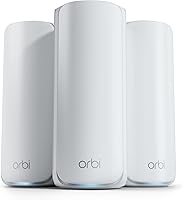
With mesh, you can place nodes along useful paths through the home instead of asking one router to reach every corner. This helps when bedrooms, an office and a downstairs room all need coverage.
An extender makes more sense when most rooms already work well. Adding one near a hallway may reach a distant bedroom without replacing the main network.
Coverage figures are estimates, not floor plans. Brick, concrete, metal, floors and interference can reduce usable reach, so don't add advertised coverage figures together and assume every room will be covered.
Mesh WiFi vs WiFi extender for one weak room
Start with an extender if there is a suitable outlet between the router and that room. The extender needs useful WiFi at its own location before it can help devices farther away.
A garage behind a masonry wall may be harder to reach than an upstairs bedroom, even at a shorter distance. If no suitable placement receives a good signal, consider a wired access point or a different network layout.
For a multi-node plan, our guide on how far apart to place mesh WiFi nodes explains why spacing and obstacles matter together.
How can you confirm this is a coverage problem?
Compare the same device near the router and in the weak room before buying anything. A clear drop as you move away points toward a coverage issue.
Use the same speed-check service in both places, with large downloads paused. Also try the activity that matters, such as a video call or streaming, because a speed number alone won't show every connection problem.
If several devices struggle even beside the router, look at the router or internet service first. An extender repeats the connection it receives, and mesh can't increase the speed of your internet plan.
If only one device struggles everywhere, check that device's software and WiFi connection. Buying coverage equipment for a single faulty device can leave the original problem unchanged.
Move the router into an open position before spending money. A cabinet, floor-level corner or spot behind a TV can weaken the signal before it reaches the rest of the home.
Do mesh systems or extenders keep one WiFi name?
Both can keep one WiFi name, so that feature alone doesn't settle the choice. NETGEAR says both extenders here use Smart Roaming to retain your existing name and move devices toward the strongest signal.
Mesh nodes work together as one managed network. That suits a household where people carry phones and laptops between several coverage areas.
A shared name doesn't guarantee an uninterrupted handoff. Your phone or laptop also influences when it leaves one connection for another, and some devices hold a weak connection longer than you'd like.
After setup, walk your usual route during a call. If the connection breaks at a doorway or stairwell, adjust placement so neighboring coverage areas overlap more effectively.
Should you keep your current router?
Keep a router that performs well across most of your home if one extender can fill the remaining gap. Consider mesh when you need several new coverage points or want to rebuild the network around them.
Both NETGEAR extenders work with existing routers and gateways, including those from major internet providers. You can extend coverage without changing the equipment that already serves most rooms.
Mesh needs more setup planning if your provider's gateway also acts as a router. Check the gateway and mesh instructions for the correct bridge or access point arrangement so you don't create avoidable routing problems.
Don't assume mesh replaces your modem or the equipment that brings service into the home. Keep required provider equipment unless your provider confirms an alternative works.
If your router frequently crashes or disconnects nearby devices, resolve that first. Our guide on whether a mesh WiFi system is worth it can help you judge a broader network change.
Which of these products fits your home?
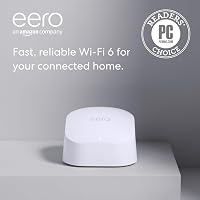
Choose the eero pack for several coverage points, the EXS27 for a busier weak area, or the EAX15 for a simpler single-room extension. The right fit depends on the work each unit needs to do.
eero 6+ suits several rooms that need help
The eero 6+ (3-pack) gives you 3 units for a whole-home layout. It supports internet plans up to a gigabit and 75+ connected devices.
Choose it when weak coverage affects separate parts of the home and you want app-guided setup and network management. eero says TrueMesh routes traffic to reduce drop-offs and dead spots.
Skip the pack if one well-placed extender would solve your only problem. Also check which optional features you want, since some security and network management tools require a separate subscription.
NETGEAR EXS27 suits a busy coverage gap
The EXS27 supports up to 45 devices and has a 2.5 Gigabit Ethernet port. It fits a weak family room where several devices connect, or a workspace with a nearby desktop.
Its WiFi 7 support makes it worth considering if your devices can benefit from that standard. It still relies on your existing router and the connection between them.
Skip it if the whole home needs better coverage or your only goal is to increase a slow internet plan. A newer extender cannot remove those limits.
NETGEAR EAX15 suits a smaller device group
The EAX15 supports up to 20 devices and WiFi 6 speeds up to 1.8 Gbps. It suits a spare bedroom or home office that needs coverage for a modest group of devices.
Both NETGEAR models advertise up to 1,500 sq ft of added coverage. Choose between them by device needs and connections rather than expecting the EXS27 to reach farther because it has a higher wireless rate.
Skip the EAX15 if you need the EXS27's higher device capacity or faster wired port. For a few devices in one weak room, those extras may offer little practical benefit.
Which is faster, mesh WiFi or an extender?
Neither type is automatically faster, because the connection path matters more than the category name. A well-placed extender can beat a poorly placed mesh node in the room you care about.
Wireless links between units carry traffic back toward the router. This connection is often called backhaul, and a weak backhaul can limit speed even when your device shows a strong local WiFi signal.
The EXS27's advertised wireless rate reaches up to 5 Gbps, but that is not a promise of internet download speed. Your plan, router, devices and radio conditions all set limits along the path.
Connecting a console or TV to an extender's Ethernet port removes the wireless link between that device and the extender. The extender may still use WiFi back to the router, so the cable doesn't bypass a weak router connection.
WiFi 7 features also depend on compatible equipment. Read WiFi 6 vs WiFi 7 if you're deciding whether the newer standard offers benefits for your current devices.
How should you set up mesh or an extender?
Set up close to the router, then move units into planned positions and check the target rooms. Complete guided pairing before trying to solve placement problems.
Set up an extender along the signal path
Use the Nighthawk app or WPS to connect either NETGEAR extender. Follow the router's instructions if you choose WPS, since button locations and pairing steps vary.
Move the extender to an outlet toward the weak room while keeping a good router connection. Halfway can be a useful starting point, but a nearby doorway may offer a better path through walls.
Keep the unit clear of furniture and large metal objects. Check the far room again, then move one outlet closer to the router if the connection is unstable.
Build a mesh layout one node at a time
Use the eero app to set up the main unit, then add the other nodes. Place them where they can connect well to the network rather than putting each one in the weakest room.
Start with the fewest nodes needed for useful coverage. Adding more units close together doesn't automatically improve speed and can make placement harder to judge.
For layout planning, read how to choose a mesh WiFi system. If setup stalls, our guide to why eero may not be working covers common troubleshooting steps.
Which mistakes cause disappointing results?
Poor placement and unrealistic speed expectations cause many avoidable problems. Judge the result in your problem rooms rather than by the signal icon beside the new unit.
- Putting equipment inside the dead zone: A strong-looking connection to an extender is little help if the extender barely reaches the router.
- Buying by floor area alone: A narrow, multi-story home needs a different layout from an open home with the same area.
- Expecting a same-name network to fix every handoff: Device behavior and overlapping coverage still affect movement between connection points.
- Chaining extenders without a plan: Extra wireless hops can reduce usable speed and make faults harder to trace.
- Expecting device capacity to equal active workload: Connected smart plugs and several simultaneous video streams place different demands on a network.
- Changing everything at once: Move one unit or change one setting, then check the result so you know what helped.
Don't buy a 3-pack simply because more equipment sounds safer. First identify useful node locations, especially if walls or outlet positions restrict where units can go.
How do you keep the improved connection reliable?
Keep equipment updated, ventilated and in its chosen position, then recheck coverage after major changes at home. Furniture moves and new electronics can change a previously useful signal path.
eero provides automatic updates; for either extender, follow NETGEAR's update instructions. Use a strong WiFi password and protect the account used to manage your network.
Keep vents clear and avoid covering equipment with clothes or placing it behind packed shelves. Unplug units before cleaning, and use a dry cloth rather than spraying cleaner onto them.
If performance drops, check whether every room is affected or only the extended area. That distinction helps you focus on the internet connection, router or link to the distant unit.
Mesh WiFi vs extender: which should you choose?
Choose by the size of the coverage problem and the quality of your current router. In the mesh WiFi vs extender decision, buy the smallest setup that can serve the rooms you actually use.
Pick the EAX15 for one reachable room with modest device needs. Choose the EXS27 when that area needs higher device capacity, WiFi 7 support or its faster Ethernet connection.
Choose the eero 6+ pack when several rooms need coordinated coverage. If WiFi is poor even beside the router, fix that underlying problem before choosing either approach.
Use do you need mesh WiFi? to confirm the scope of the problem, then compare best mesh WiFi systems if multiple nodes make sense.
For a broader explanation, keep our complete mesh WiFi guide handy. You can also browse our mesh WiFi systems guide once you've mapped the rooms and placement options.
Frequently asked questions
Is mesh WiFi better than an extender?
Mesh WiFi is usually better for several weak areas, while an extender suits one reachable dead zone. Choose by layout rather than home size alone: a small home with thick walls can need several connection points, while a larger home may have only one room that needs help.
Does a WiFi extender create a new network name?
An extender doesn't always create a new network name; NETGEAR says both models here keep your existing name through Smart Roaming, which is designed to move devices toward the strongest signal. Device behavior still affects handoffs, so walk between rooms during a call after setup to check the result.
Where should you place a WiFi extender?
Place an extender between the router and the weak area, where it still receives a strong, useful signal; halfway is only a starting point because walls and floors change the signal path. Try nearby outlets, then compare performance in the target room before choosing the final position.
Can you use an extender with any router?
Both NETGEAR extenders here work with any router or gateway, according to NETGEAR; that compatibility doesn't remove limits from the router, internet plan or wireless signal path. Keep the router if it works well nearby, and place the extender where it has a good connection back to it.
Should you buy mesh WiFi or an extender for a large home?
Choose mesh when several parts of a large home need coverage; choose an extender when only one reachable area is weak; floor layout and wall materials matter more than floor area alone. Use the large-home mesh WiFi guide to compare options once you've mapped the rooms that need help.