5 Best Mesh WiFi Systems for Large Homes (October 2026)
The best mesh WiFi systems for large homes include the Netgear Orbi 770 (3-pack) for large multi-story homes, the eero Pro 7 (3-pack) for device-heavy households, and the ASUS ZenWiFi BT6 (3-pack) for family network management.
On this page (6 sections)
- The best mesh WiFi systems for large homes
- How do you choose the best mesh WiFi system for a large home?
- How should you set up mesh WiFi across a large home?
- Which mesh WiFi mistakes cause weak rooms and wasted upgrades?
- How do you keep a large-home mesh network working well?
- Which large-home mesh system should you pick?
The best mesh WiFi system for a large home is the Netgear Orbi 770 (3-pack) for its broad coverage claim and 3-unit layout. Pick eero Pro 7 for a device-heavy household, or choose an ASUS system when network controls or fast wired connections lead your requirements.
The right kit needs to reach your rooms and keep its nodes connected. A long ranch, a tall townhouse and a brick home can need different layouts despite having the same floor area.
Our complete guide to mesh WiFi systems explains the basics. If your current router reaches most rooms, first check whether you need mesh WiFi.
Our picks at a glance
-
1

-
2

-
3

The best mesh WiFi systems for large homes
The Orbi 770 is the starting choice for a large home that needs several coverage points. Move to another pick when you have a clear reason: more connected devices, included family controls, faster wired equipment or a broader floor plan.
We compared coverage claims, placement options, connections, controls and expansion paths. The order favors the overall large-home fit; the most capable ports don't automatically make a system the right choice for every house.
| Product | Best for | Coverage | Device capacity | Internet plan support | Our score |
|---|---|---|---|---|---|
| Netgear Orbi 770 (3-pack) | large multi-story homes | Up to 8,000 sq. ft. | Up to 100 devices | Plans up to 2.5 Gbps | 8.8 |
| eero Pro 7 (3-pack) | device-heavy households | Up to 6,000 sq. ft. | 600+ devices | Plans up to 5 Gbps | 8.7 |
| ASUS ZenWiFi BT6 (3-pack) | family network management | Up to 7,600 sq. ft. | 7.7 | ||
| ASUS ZenWiFi BT10 (2-pack) | wired home offices | Up to 6,000 sq. ft. | 7.4 | ||
| Netgear Orbi 870 (3-pack) | sprawling homes | Up to 9,000 sq. ft. | Up to 150 devices | 7.2 |
Netgear Orbi 770 (3-pack)
- Up to 8,000 sq. ft. claimed coverage
- Up to 100 devices
- Tri-band WiFi 7
- Guided Orbi app setup
A router and 2 satellites give you separate placement points for different floors or wings. Choose it for broad coverage needs and guided network management.
Pros
- Three units for flexible placement
- Automatic firmware updates
- Expandable with Orbi 770 satellites
Cons
- Not the choice for plans above 2.5 Gbps
- NETGEAR Armor requires a subscription after its 30-day trial
- Made for US use only
Choose the Orbi 770 for multiple floors or separate wings where one router leaves weak rooms. Its router and 2 satellites give you 3 places to build coverage, with NETGEAR claiming up to 8,000 sq. ft. and support for up to 100 devices.
The system uses tri-band WiFi 7 with Enhanced Backhaul, which supports communication between mesh units. It accepts internet plans up to 2.5 Gbps, making it a sensible match when you want broad coverage without needing a faster internet connection.
Guided setup in the Orbi app suits buyers who want help getting started. The app also manages connected devices and guest WiFi, while Advanced Router Protection and automatic firmware updates are included.
NETGEAR Armor is separate from those built-in features and requires a subscription after its 30-day trial. Decide whether you want that service before treating every security feature as part of the ongoing package.
Skip it for an internet plan above its supported limit, or if you need hardware for use outside the US. Expansion is possible with an Orbi 770 satellite, which NETGEAR rates for up to 2,750 sq. ft. of additional coverage.
eero Pro 7 (3-pack)
- Up to 6,000 sq. ft. claimed coverage
- Supports 600+ devices
- Tri-band WiFi 7
- Two auto-sensing 5 GbE ports per unit
This three-pack suits homes with many connected devices and buyers expanding an existing eero network. Its wired ports also fit multi-gig internet plans.
Pros
- High claimed device capacity
- Compatible with earlier eero generations
- Three-year warranty
Cons
- Smaller claimed coverage area than Orbi 770
- Advanced security and parental controls require optional eero Plus
Choose eero Pro 7 for a connected household with many smart devices, computers and entertainment systems. eero rates the three-pack for 600+ devices and coverage up to 6,000 sq. ft.
It supports internet plans up to 5 Gbps and includes 2 auto-sensing 5 GbE ports per unit. eero's claimed wireless speed of up to 3.9 Gbps is a different measure from the supported internet plan, so don't expect every phone to receive the plan's full speed.
Compatibility with earlier eero generations makes this a useful option for an existing eero household. Keep the role of older units in mind, since combining generations doesn't turn their hardware into newer equipment.
eero's TrueMesh, TrueRoam and TrueChannel software manages connection paths, roaming and channel choices. The system also comes with a 3-year warranty.
Skip it if included parental controls are essential, since those and advanced security are part of optional eero Plus. Its device-capacity claim also shouldn't drive the purchase if your real problem is reaching a distant wing through dense walls.
ASUS ZenWiFi BT6 (3-pack)
- Up to 7,600 sq. ft. claimed coverage
- Tri-band WiFi 7
- Subscription-free AiProtection Pro
- Parental controls and VPN support
The BT6 combines a three-unit layout with included security, parental controls and options for managing smart devices. Compatible ASUS routers can extend its AiMesh network.
Pros
- Included security and parental controls
- Wired or wireless backhaul
- Expansion with compatible ASUS routers
Cons
- No device-capacity figure provided here
- Coverage depends on walls, floors and placement
Choose the ASUS ZenWiFi BT6 for family network management across several parts of a home. ASUS claims coverage up to 7,600 sq. ft. from this three-pack, with AiMesh expansion through compatible ASUS routers.
Its main appeal is the included set of controls: subscription-free AiProtection Pro, parental controls and VPN support. Smart Home Master SSIDs add ways to organize smart devices and manage their connections.
Those tools suit a household that wants to set rules for different users or device groups. Plan who needs access to shared printers, TVs and other local devices before dividing the network into separate groups.
The BT6 supports wired or wireless backhaul, giving you a useful choice when walls weaken the links between nodes. An Ethernet run to another floor can be more valuable than placing an extra wireless unit beyond the same obstruction.
Skip it if a published device-capacity limit is central to your purchase, since no figure is supplied here. Choose it for the combination of included controls and 3 placement points, rather than assuming its capacity matches another system's claim.
ASUS ZenWiFi BT10 (2-pack)
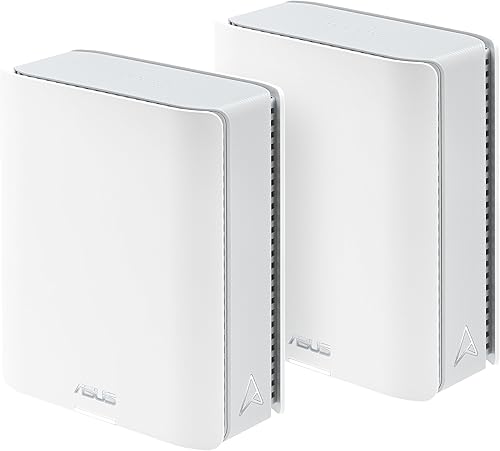
- Up to 6,000 sq. ft. claimed coverage
- Dual 10G WAN and LAN ports
- Tri-band WiFi 7
- Up to three Smart Home Master SSIDs
Choose this two-unit system for a wired office or local network that can use its 10G connections. Smart Home Master adds ways to manage separate device groups.
Pros
- 10G WAN and LAN connectivity
- Wired or wireless backhaul
- Included security and parental controls
Cons
- Only two initial placement points
- 10G benefits require compatible equipment
Choose the ASUS ZenWiFi BT10 for a wired home office or local network built around fast Ethernet equipment. Dual 10G WAN and LAN ports are its clearest advantage over systems aimed mainly at wireless coverage.
ASUS claims up to 6,000 sq. ft. of coverage from 2 units. That layout fits best when you have 2 useful positions that can serve the home, rather than several separate wings needing their own nearby node.
Wired or wireless backhaul lets you connect the units in a way that suits the building. With Ethernet between floors, the remote unit doesn't have to send its backhaul traffic through the same dense floor that blocks your devices.
Smart Home Master supports up to 3 SSIDs, alongside VPN options, parental controls and included network security. Compatible ASUS routers can extend the AiMesh network later.
Skip it if your equipment can't use the faster ports and you mainly need more coverage points. A computer, switch or storage device with a slower network connection limits that part of the path, regardless of the router's port speed.
Netgear Orbi 870 (3-pack)

- Up to 9,000 sq. ft. claimed coverage
- Up to 150 devices
- Tri-band WiFi 7
- 10G internet port and 2.5G LAN ports
The Orbi 870 suits a broad floor plan paired with a fast internet connection. Its router and 2 satellites combine the largest coverage claim here with multi-gig wired connections.
Pros
- Largest claimed coverage area in this group
- Supports internet plans up to 10 Gbps
- Expandable with Orbi 870 satellites
Cons
- LAN connections run below the internet port's maximum speed
- NETGEAR Armor requires a subscription after its 30-day trial
- Made for US use only
Choose the Orbi 870 for a sprawling floor plan paired with a fast internet service. NETGEAR claims coverage up to 9,000 sq. ft. and support for up to 150 devices from its router and 2 satellites.
Its 10G internet port supports plans up to 10 Gbps, while the LAN ports across the router and satellites run at 2.5G. That distinction matters: one wired device on a LAN connection won't receive the internet port's full maximum rate.
The tri-band WiFi 7 system uses Enhanced Backhaul. NETGEAR's combined wireless speed claim reaches 21 Gbps, which describes wireless capacity rather than the download speed promised to a single device.
The Orbi app provides guided setup and device management. Automatic firmware updates and Advanced Router Protection are included; Armor requires a subscription after its 30-day trial.
Skip it when your main problem is one blocked room on an otherwise adequate network. For a broader expansion, NETGEAR rates an additional Orbi 870 satellite for up to 3,000 sq. ft.; this system is made for US use only.
How do you choose the best mesh WiFi system for a large home?
Choose by floor plan and connection paths first, then match internet support, device needs and controls. Write down the rooms that need reliable service before comparing headline speed figures.
Match large-home mesh WiFi coverage to your floor plan
Use coverage claims to narrow the choices, then look at the shape of your home. A compact house with open rooms gives radio signals a different path from a narrow house with several closed-off additions.
Sketch each floor and mark the modem, work areas, TVs and weak rooms. Add likely node positions with power outlets, remembering that the main unit usually needs a cable connection to your internet equipment.
For a ranch, consider how the signal will travel down its length. For multiple floors, look for routes near stairs or open landings rather than assuming the signal will pass cleanly through dense flooring.
A detached office needs separate planning. Don't assume a whole-home coverage claim includes a dependable path through exterior walls and across a yard.
Separate internet speed from home network speed
Your internet plan sets the ceiling for internet traffic, while local transfers depend on the equipment along their own path. A faster mesh system can't make a slower service deliver more bandwidth.
Wireless speed claims often combine capacity across bands. They aren't the speed that every connected laptop receives, and performance changes with distance, interference and the device's own WiFi hardware.
Local storage changes the buying decision. If you move large files between a computer and a network drive, faster wired connections may help even without a fast internet plan.
Check the full chain: modem or fiber equipment, router, switch, cable and client device. One slower connection can limit the transfer you care about.
Choose backhaul around your walls
Backhaul is the connection between mesh units. With wireless backhaul, a satellite needs a useful radio path back into the network as well as a useful position near your devices.
Tri-band systems offer more radio resources, but the label doesn't automatically mean a whole band is reserved only for backhaul. Thick walls still matter.
Where supported, Ethernet backhaul carries traffic between units by cable. It's especially worth considering for dense floors, masonry walls or an office that must stay connected during long calls.
The ASUS systems here explicitly offer wired and wireless backhaul. For any system, confirm its connection instructions and required ports before planning a cable layout.
Count busy devices, not just connected devices
Device totals help describe scale, but activity matters more than the raw count. A smart plug sending occasional commands creates a different load from a computer uploading large work files.
List simultaneous demands during your busiest hour. Include video calls, streaming, game downloads, camera traffic and cloud backups, rather than just counting every item with WiFi.
If weak rooms stay slow even when the household is quiet, start with coverage and backhaul. If every room slows during heavy use, also consider internet capacity and upload demand.
Choose controls you'll actually use
Included controls matter when you need family rules, VPN options or ways to organize smart devices. Compare those needs before deciding whether an optional subscription is worthwhile.
The ASUS picks include parental controls and network security. eero puts advanced security and parental controls in optional eero Plus, while the Orbi systems separate their included protections from Armor.
Our guide to mesh WiFi systems without a subscription can help if ongoing service costs affect your choice. Avoid paying for overlapping tools you already have through another service.
How should you set up mesh WiFi across a large home?
Set up the main unit first, then add nodes in positions with a strong connection path. Check the rooms you use before settling on permanent locations.
Prepare the internet connection
Identify whether your provider supplies a modem, a separate router or a combined gateway. Mesh doesn't replace the function of a modem or the fiber equipment your service requires.
Follow the mesh setup instructions and your provider's guidance for connecting that equipment. If both the gateway and mesh route traffic, double NAT can complicate gaming, remote access or port forwarding.
Bridge mode or an access-point arrangement may suit the setup, depending on supported features. Save existing settings before changing modes, and avoid disabling functions you still need.
Position nodes before hiding cables
Start with open shelves or clear furniture surfaces where the units can stand as directed. Avoid cabinets, metal enclosures and locations directly behind large appliances.
Place a wireless satellite between the main unit and the weak area, rather than inside the dead zone itself. It needs a connection to pass along.
Keep positions adjustable until you've checked adjacent rooms and other floors. For more detail, use our guide to mesh node spacing.
Check your normal work and entertainment spots
Use the same device to compare connections at your desk, TV and other key locations. Check both responsiveness and useful tasks, such as joining a video call or starting a stream.
Compare performance near the main router with performance near each satellite. If the main router performs well but one satellite area struggles, focus on that node's position and backhaul.
Move one unit at a time so you can see what changes. If several rooms share the same weak route, a cable connection may solve more than repeated wireless repositioning.
Reconnect devices with a plan
Reusing your old network name and password can reduce reconnection work for some devices. Retire the old WiFi network when appropriate so it doesn't remain as an unintended competing network.
Connect essential computers and phones first, then add smart-home equipment in groups. Follow each device's setup requirements if it has trouble joining.
Create guest access for visitors, and use separate smart-device networks thoughtfully. Some casting, printing and device-discovery features depend on devices being able to communicate locally.
Which mesh WiFi mistakes cause weak rooms and wasted upgrades?
The most common mistake is adding hardware before finding the weak link. A faster router, extra satellite or higher internet tier helps only when it addresses the cause.
Putting every node at the edge of coverage
A satellite with a poor upstream connection can show nearby devices a strong WiFi signal while still delivering a slow internet connection. The phone-to-satellite link is only part of the route.
Move the satellite closer to the network, then check the distant room again. Don't use the signal icon alone as proof that the whole connection is healthy.
Assuming more nodes always help
Extra nodes add placement options, but crowding units into nearby rooms can increase overlapping radio traffic. Start with the included kit and improve its positions before expanding.
Buy another unit when you have a clear location and connection plan for it. Match the exact system family rather than assuming any same-brand satellite will work.
Choosing WiFi 7 to solve every coverage problem
WiFi 7 features require support from the relevant devices and network equipment. Older clients won't gain every newer feature simply by joining a new system.
A better layout can matter more than a higher wireless speed claim. Our WiFi 7 router guide helps compare router options, while our best WiFi routers for large homes guide suits buyers considering a single coverage point.
Treating mesh as a fix for provider problems
If the connection fails beside the main router too, check your internet service and its equipment before blaming satellite placement. Mesh can't restore an upstream outage.
Also watch for heavy uploads or downloads that affect the whole household. Moving a satellite won't remove an internet bandwidth limit.
How do you keep a large-home mesh network working well?
Keep firmware, placement and device access in good order. A stable network benefits from small maintenance checks rather than frequent resets.
Leave ventilation space around each unit and clear dust from accessible surfaces according to its care instructions. Don't stack equipment on top or cover it with household items.
Use a strong administrator password and enable available account protection. Review connected devices occasionally, remove access you no longer need and keep guest credentials separate from your main password.
Recheck weak areas after moving furniture, relocating a node or adding equipment. If a problem starts suddenly, check cables, power and service status before resetting the whole system.
Which large-home mesh system should you pick?
For the best mesh WiFi system for your large home, choose the kit whose placement options and connections solve your specific problem. Make the choice around the busiest rooms and the paths between them.
- Pick Orbi 770 for broad household coverage with a router and 2 satellites.
- Pick eero Pro 7 for many connected devices or an existing eero network.
- Pick ASUS BT6 for included family controls and several placement points.
- Pick ASUS BT10 for a wired office that can use its faster Ethernet connections.
- Pick Orbi 870 for a sprawling home with a fast internet plan.
Before ordering, identify a usable location for every included unit. If you can't map a good wireless route between floors or wings, plan supported wired backhaul before buying more hardware.
For a wider comparison across home sizes, see our best mesh WiFi systems guide.
Our top 3 picks at a glance
-
1
-
2
-
3
Frequently asked questions
How many mesh nodes do I need for a large home?
Choose node count around your floor plan, rather than square footage alone. Three units give you more placement options for separate floors or wings, while two may suit an open layout; dense walls can make a wired connection between nodes more useful than adding another wireless node.
Does a mesh WiFi system cover the advertised square footage?
Advertised coverage is an upper guide, not a promise of equal signal in every room; walls, floor materials and node placement affect usable coverage. Keep each wireless node within reach of the network, then check your key rooms; see our guide to how far apart mesh WiFi nodes should be.
Is WiFi 7 necessary for a large home?
No, a large home needs suitable coverage and good connections between nodes more than a particular WiFi generation. WiFi 7 features can benefit compatible devices, but they won't remove wall interference; choose the layout, backhaul options and wired connections that fit your home before focusing on wireless speed claims.
Should I choose more coverage or more device capacity?
Choose coverage first when distant rooms lose their connection, and consider capacity when your household has many connected devices. Device totals don't describe how much traffic those devices create; several busy computers can demand more bandwidth than a larger collection of mostly idle smart plugs and sensors.
Can I add more nodes later?
Yes, but expansion depends on model compatibility; Orbi 770 and Orbi 870 accept their respective compatible satellites, ASUS AiMesh works with compatible ASUS routers, and eero Pro 7 supports earlier eero generations. Plan where the extra unit will connect before buying it, especially when thick walls block the route.