Netgear Orbi 770 Review: Worth It? (October 2026)
The Netgear Orbi 770 (3-pack) suits large US homes that need several WiFi access points and support for internet plans up to 2.5 Gbps. Choose it for coverage across rooms and floors; compare the alternatives below for faster internet connections or built-in parental controls.
On this page (10 sections)
- Is the Orbi 770 a good fit for your home?
- What does the Orbi 770 include?
- How much of Orbi 770's WiFi speed can you use?
- How does Orbi 770 compare with eero Pro 7?
- Is ASUS ZenWiFi BT6 better for family controls?
- Should you choose Orbi 870 instead?
- What should you check before buying Orbi 770?
- How should you set up the Orbi 770?
- How do you keep the network working well?
- Is the Orbi 770 worth buying?
The Netgear Orbi 770 is a good fit for large US homes that need WiFi across several rooms or floors and have internet plans up to 2.5 Gbps. Its main appeal is spreading access points around the house while keeping compatible older devices connected.
Buy it to address weak coverage, not simply to replace a lower WiFi number with a higher one. A new mesh system cannot fix a slow connection arriving from your internet provider.
The alternatives below serve different needs: faster internet connections, included network controls or more capacity for wired equipment.
Is the Orbi 770 a good fit for your home?
The Orbi 770 suits households with several widely separated rooms that need WiFi. A home office upstairs, a downstairs TV and bedrooms beyond the main router are stronger reasons to choose it than square footage alone.
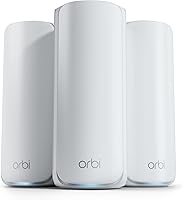
Netgear Orbi 770 (3-pack)

- Tri-band WiFi 7
- Up to 8,000 sq. ft.
- Up to 100 devices
- 2.5 Gbps internet port
A router and two satellites for families who need WiFi across several rooms or floors. Backward compatibility keeps WiFi 6 and WiFi 5 equipment connected.
Pros
- Rated for up to 8,000 sq. ft. and 100 devices
- Tri-band with Enhanced Backhaul
- Works with WiFi 6 and WiFi 5 devices
- App-guided setup
Cons
- Coverage depends on walls and satellite placement
- NETGEAR Armor requires a separate subscription after its 30-day trial
- Made for use in the US only
NETGEAR rates the router and 2 satellites for up to 8,000 sq. ft. and 100 devices. Treat that coverage as a planning limit, since brick, concrete, floors and the route between units affect how far the network reaches.
A long, narrow house can need different placement from an open home of the same size. In a multistory home, the useful path between floors may matter more than the distance shown on a floor plan.
Who should skip the Orbi 770?
Skip this three-pack if one well-placed router already reaches your main rooms. Extra mesh units need useful positions and good connections to each other; adding them without a coverage need can add clutter and setup work.
Also look elsewhere if your internet plan exceeds the system's connection limit and you want to use that speed. Households buying outside the US should choose equipment intended for their region, since this Orbi model is made for US use only.
If you're still choosing between one router and several access points, our mesh WiFi systems guide explains the basic layouts. Our WiFi 7 router guide covers alternatives across both formats.
What does the Orbi 770 include?
The package includes one RBE771 router, two RBE770 satellites, three power adapters, a 2 m Ethernet cable and a quick start guide. You'll need power outlets at all 3 locations and a suitable spot for the main router near your internet equipment.
The system uses the Orbi app for guided setup, connected-device management and guest WiFi. That suits households that want common network tasks available from a phone.
Advanced Router Protection and automatic firmware updates are included. NETGEAR Armor is optional, with a 30-day trial followed by a separate subscription if you continue.
Decide which extra security tools you need before enrolling in a paid service. Don't confuse an optional security package with a requirement to keep the mesh network working.
How much of Orbi 770's WiFi speed can you use?
The Orbi 770's advertised up to 11 Gbps WiFi figure is not a single-device internet download promise. Your provider plan, connection ports, device capabilities and signal quality each place their own limits on speed.
The system uses tri-band WiFi 7 with Enhanced Backhaul. Backhaul is the connection carrying traffic between mesh units, so a satellite needs a good link to the rest of the network as well as to your devices.
WiFi 6 and WiFi 5 equipment can still connect. Those devices retain their own wireless limits, so replacing the router doesn't turn an older laptop into a WiFi 7 device.
For video calls, gaming and everyday work, consistent coverage at the desk or sofa often matters more than a maximum speed number. A room with a weak connection needs better placement or another connection path before it needs a larger advertised total.
Our guide to whether a WiFi 7 router is worth it can help if your current network already covers the house and speed is your only reason to upgrade.
How does Orbi 770 compare with eero Pro 7?
Choose eero Pro 7 for faster internet service or existing eero equipment. Choose Orbi 770 when its larger coverage rating better matches your floor plan and you don't need the faster internet connection.
eero Pro 7 (3-pack)

- Tri-band WiFi 7
- Up to 6,000 sq. ft.
- Up to 5 Gbps plans
- Two 5 GbE ports per unit
Fits households moving beyond the Orbi 770's internet connection limit or expanding an existing eero network. Its two 5 GbE ports per unit also suit faster wired equipment.
Pros
- Supports plans up to 5 Gbps
- Two auto-sensing 5 GbE ports per unit
- Rated for 600+ devices
- Three-year warranty
Cons
- Lower rated coverage than the Orbi 770
- Advanced security and parental controls require optional eero Plus
The eero three-pack supports plans up to 5 Gbps, with two auto-sensing 5 GbE ports per unit. It is rated for up to 6,000 sq. ft. and 600+ devices, with advertised wireless speeds up to 3.9 Gbps.
Its device capacity is useful context for a home with many connected gadgets, but count active workloads too. Several cameras uploading video place different demands on a network from dozens of mostly idle smart plugs.
eero Pro 7 works with earlier eero generations and eero Built-in on select Echo devices. That makes it worth considering if you want to reuse compatible equipment, although older units keep their own limits.
eero includes TrueMesh, TrueRoam and TrueChannel software, plus a three-year warranty. Advanced Security, Ad Blocking and Parental Controls are among the features in optional eero Plus.
Skip this alternative if your main reason for switching is its faster ports but your modem, plan and wired devices can't use them. Our eero Pro 7 vs Orbi 770 comparison goes deeper, while eero vs Orbi covers the broader brand choice.
Is ASUS ZenWiFi BT6 better for family controls?
Choose ASUS ZenWiFi BT6 if included network controls lead your decision. Its AiProtection Pro, parental controls, VPN support and Smart Home Master SSIDs give families more reasons to compare it than wireless speed alone.
ASUS ZenWiFi BT6 (3-pack)

- Tri-band WiFi 7
- Up to 7,600 sq. ft.
- AiProtection Pro
- Parental controls
A useful alternative for households that prioritize included parental controls, separate smart-home networks and VPN tools.
Pros
- AiProtection Pro without a security subscription
- Parental controls and Smart Home Master SSIDs
- Wired backhaul support
- Compatible ASUS routers can extend AiMesh
Cons
- Lower rated coverage than the Orbi 770
- AiMesh expansion requires compatible ASUS routers
ASUS rates the three-pack for up to 7,600 sq. ft., with advertised tri-band WiFi 7 speeds up to 9.4 Gbps. Its network security does not require a subscription.
Separate network names can help organize smart-home devices and household access. Before choosing, decide whether you want those controls or mainly need better coverage with fewer settings to manage.
BT6 also supports Ethernet backhaul and AiMesh expansion with compatible ASUS routers. A wired link between units is useful when thick walls make wireless connections difficult.
Skip it if those management features won't get used and you have no interest in compatible ASUS expansion. Our best ASUS routers guide covers other choices within that system.
Should you choose Orbi 870 instead?
Choose Orbi 870 when your internet connection and wired equipment justify more capacity. Its 10 Gig internet port and 2.5 Gig LAN ports across the router and satellites give it a clearer role than simply being the larger Orbi.
Netgear Orbi 870 (3-pack)

- Tri-band WiFi 7
- Up to 9,000 sq. ft.
- Up to 150 devices
- 10 Gig internet port
Choose this larger Orbi system when a fast internet connection and several wired devices justify its extra capacity.
Pros
- Rated for up to 9,000 sq. ft. and 150 devices
- 10 Gig internet port
- 2.5 Gig LAN ports across router and satellites
Cons
- Extra capacity offers less value with a slower internet plan
- NETGEAR Armor requires a separate subscription after its 30-day trial
- Made for use in the US only
NETGEAR rates this three-pack for up to 9,000 sq. ft. and 150 devices, with advertised WiFi speeds up to 21 Gbps. It supports internet plans up to 10 Gbps.
That combination suits a household planning fast internet service alongside wired gaming PCs, storage or office equipment. Check the speed of each connection in the path, since a slower port can still limit a device.
Skip the upgrade if you have a modest internet plan and mostly use phones, TVs and ordinary web browsing. Extra port capacity won't improve the service entering your home.
The 870 shares the Orbi app approach, included router protection and optional Armor subscription structure. It is also made for US use, so it isn't a way around the 770's regional restriction.
What should you check before buying Orbi 770?
Check the source of your slowdown and the locations needing coverage before choosing a mesh kit. These checks help you avoid replacing equipment that isn't causing the problem.
- Compare nearby and distant connections. If internet use is poor beside the current router as well as upstairs, check your provider connection and modem before blaming coverage.
- Map the rooms you use. Mark workspaces, TVs and camera locations, then identify places between them where satellites can sit in the open.
- Count demanding uses. Video calls, large downloads and uploads matter more than a raw total of connected gadgets.
- Check wired requirements. Write down which devices need Ethernet and the connection speeds they can use before choosing between these systems.
- Plan expansion carefully. NETGEAR says an extra 770 satellite can add up to 2,750 sq. ft., but fix placement before adding another unit.
For other layouts, see our WiFi routers for large homes guide. Our guide to how to choose a mesh WiFi system helps turn those room and device needs into a shortlist.
How should you set up the Orbi 770?
Start with the main router connected to your existing modem or provider equipment, then follow the Orbi app's setup steps. Add the satellites before moving them to their planned locations so you can resolve connection issues nearby.
The Orbi works with cable or fiber provider equipment, but it doesn't replace the equipment that brings internet service into the home. If your provider box also acts as a router, check its bridge mode guidance or the appropriate access point arrangement for your setup.
Running 2 routers in sequence can complicate gaming, remote access and device discovery. Choose which device will handle routing rather than leaving both arrangements in place without checking.
Place satellites between the main router and weak rooms, where they can still receive a useful connection. Putting a satellite at the far end of an existing dead zone leaves it struggling to receive the traffic it needs to pass on.
Keep units out of closed cabinets and away from large metal objects. In multistory homes, try positions near a stairwell or a more open route between floors.
Use our guide to distance between mesh WiFi nodes when planning spacing. After setup, use your normal calls, streaming and downloads in the rooms that matter, then adjust one satellite at a time.
How do you keep the network working well?
Keep firmware updates, airflow and device access under control after setup. A stable mesh network needs occasional attention when your home layout or connected equipment changes.
Leave space around each unit and keep vents free of dust. Unplug a unit before wiping its exterior with a dry cloth, and keep liquids away from the equipment.
Use a strong administrator password and give visitors guest WiFi access rather than sharing the main household password. Review connected devices occasionally so unfamiliar names don't go unnoticed.
If a problem affects one device, check that device before restarting the whole network. If several rooms are affected, check the modem connection and satellite status, then change one thing at a time.
Avoid moving satellites whenever a single download seems slow. Compare several uses and locations first so you don't disturb good placement to solve a temporary service problem.
Is the Orbi 770 worth buying?
Buy the Orbi 770 for a large home that needs several well-placed access points, with an internet plan within its 2.5 Gbps limit. Choose fewer units or keep your current router if coverage is already good.
Pick eero Pro 7 for faster internet service or compatible eero expansion, ASUS BT6 for included family controls, and Orbi 870 for a more demanding wired network. If Orbi and eero are your finalists, use our eero Pro 7 vs Orbi 770 comparison to make the final choice.
Frequently asked questions
Is the Netgear Orbi 770 worth it?
The Orbi 770 is worth considering for a large home where one router cannot reach the rooms you use; it suits households that want WiFi 7 while keeping older devices connected. Skip the three-pack if your current router already covers your home or your main problem is slow service from your provider.
How much area does the Orbi 770 cover?
NETGEAR rates the three-pack for up to 8,000 sq. ft., with actual coverage depending on walls, floors and satellite placement; an additional Orbi 770 satellite can add up to 2,750 sq. ft., according to NETGEAR. Place each satellite within useful reach of another mesh unit rather than inside an existing dead zone.
Can I use the Orbi 770 with my current modem?
The Orbi 770 connects to an existing modem and works with cable or fiber provider equipment for plans up to 2.5 Gbps; it does not replace the modem or fiber connection equipment. If your provider box also handles routing, check the appropriate bridge or access point arrangement before completing setup.
Does the Orbi 770 require a subscription?
You don't need NETGEAR Armor to use the Orbi 770 as a mesh network; Armor has a 30-day free trial and requires a separate subscription afterward. Advanced Router Protection and automatic firmware updates are included features, so decide separately whether you want Armor's additional security tools.